RoboVibe - Strategy and Mission Planning Platform
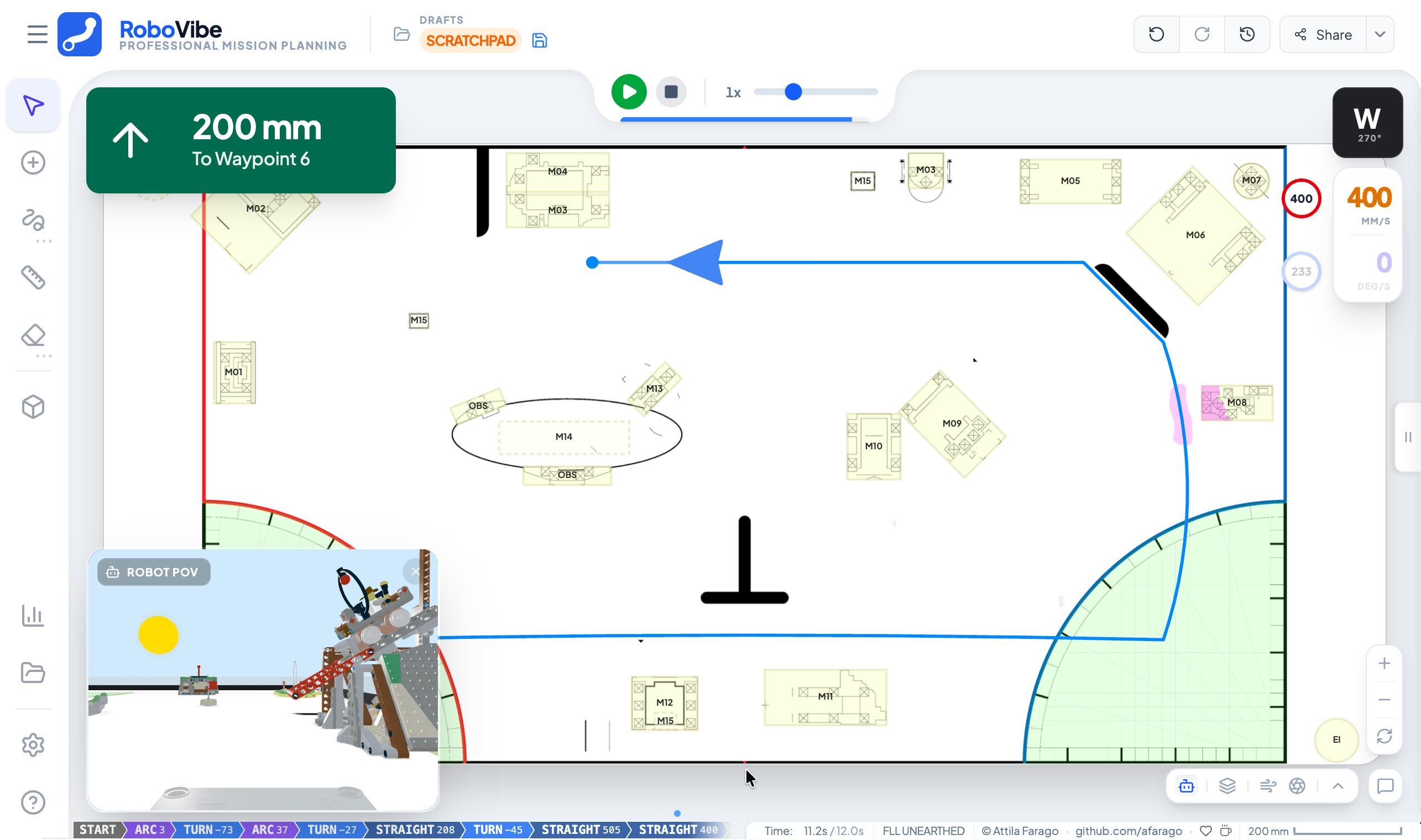
RoboVibe is an interactive, visual path-planning, physics-based simulation, and strategy platform designed for mobile robots. It combines precise field mapping, physics-based simulation, and comprehensive mission management to help teams, educators, and hobbyists design reliable robot runs (specifically tailored for competitive robotics like FIRST LEGO League and World Robot Olympiad).
Why RoboVibe Exists
Designing reliable robot missions requires more than just drawing a line. It demands accurate geometry, an understanding of physics, and strategic scoring:
- Precision: Design on a 1:1 scale field map where every millimeter counts.
- Physics Intuition: Visualize wheel slip, friction, and dynamic errors before you run the robot on physical tables.
- Strategy & Scoring: Manage mission objectives, track scores, and optimize your run for maximum points.
- Reproducibility: Export clean, kinematic-aware code (Python/Pybricks) ready for your robot.
Key Modules & Detailed Features
🗺️ Interactive Map Planner (/)
- 2D & 3D Vector Canvas: Switch between precise 2D field planning and 3D visualization.
- Smart Editing & Arcs: Drag-and-drop waypoints with magnetic grid/angle snapping; convert straight segments to smooth Bezier curves or radius arcs.
- Physics Simulation: Real-time wheel slip probability overlays, centrifugal force warnings, acceleration limits, and dynamic friction analysis.
- Code Generation: Instant export to structured kinematic-aware Python code (Pybricks, SPIKE Prime, EV3).
- Multi-Layer Overlays: Toggle path layers, robot footprints, measurement dimension lines, and playback controls.
⚡ Visual Flow Engine (/flow)
- Reactive Node Canvas: Node-based visual programming environment for telemetry processing, filtering, and hub control.
- Rich Node Library: Built-in nodes for BLE sensors, transforms, motor/drivebase outputs, speech, sound, manual inputs, and custom Python execution.
- Group & Subflow Support: Group nodes into simple containers or sealed subflows (
Gshortcut) with dedicated subflow tab views. - Alignment & Equal-Gap Distribution: Align selected nodes (Top, Middle, Bottom, Left, Center, Right) or distribute with equal spacing horizontally/vertically via context menus.
- Group-Aware Clipboard: Full Cut (
Cmd/Ctrl+X), Copy (Cmd/Ctrl+C), and Paste (Cmd/Ctrl+V) support with top-level selection filtering and visual copy checkmark badges.
🧠 AI & Machine Learning Lab (/ai)
- Teachable Machine Integration: Import and run custom image, pose, and audio classification models directly in the browser.
- Real-Time Vision & Audio: MediaPipe pose detection, holistic face/hand tracking (mouth, eyebrow aperture), and YAMNet audio classification.
- Flow Pipeline Bridging: Stream real-time AI inference metrics and class probabilities directly into Flow node graphs.
🏆 Strategy & Score Planner (/score)
- Interactive Score Manager: Define and track competition mission objectives with automatic score tallying.
- Exclusive Scoring Rules: Support for mutual exclusivity rules, shared mission pools, and tier caps.
- Presentation Modes: “Winged” and “Standard” presentation views for team strategy reviews and judge presentations.
⏱️ Match Timer (/timer)
- Competition Match Timer: Official match countdown timer with customizable sound presets and start/stop controls.
- Synced Timer Sharing: Real-time peer-to-peer match state synchronization across multiple devices via session IDs.
📜 Rules Quiz (/quiz)
- Interactive Rules Quiz: Self-assessment and practice engine for team members and judges.
- Category Filtering & Explanations: Filter questions by topic and receive instant rule explanation feedback.
🌉 GitHub & Gist Bridge (/bridge)
- Repository & Gist Import: Import and parse Python robot scripts directly from GitHub repositories, branches, or Gists.
- OAuth Sync: Supabase-powered GitHub OAuth integration for accessing private repositories and gists.
📡 Coral & BLE Remote (/coral)
- Direct Hub Control: Remote control interface supporting Pybricks BLE/USB, HubOS LWP framing, and Coral BLE devices.
- Gamepad Integration: Haptic pattern design and gamepad button mappings for remote driving.
⚙️ Field & Robot Config Editor (/config-editor)
- Field Map & Mission Editor: Visual editor for custom field map dimensions, mission target coordinates, and scoring rules.
- Robot Profile Designer: Customize robot dimensions, wheel track, speed profiles, and 3D GLB model previews.
🎮 Educational Mini-Games (/games)
- Physics Games: Interactive educational mini-games (such as Robot Jumper) for practicing timing and momentum physics.
☁️ Cloud & Productivity Features
- Auto-Sync & Collaboration: Changes are saved locally and synced to the cloud (Supabase) when online across tablets and laptops.
- Keyboard Shortcuts: Efficient navigation (Arrow keys, WASD) and editing (
Cmd/Ctrl+Xcut,Cmd/Ctrl+Ccopy,Cmd/Ctrl+Vpaste,Cmd/Ctrl+Zundo,Delete/Backspace). - Context Menus: Right-click context menus for quick access to mission toggles, segment types, node alignment, group management, and canvas imports.
Links & Community
- Live Application: robovibe.afarago.hu
- Community Repository: afarago/robovibe-community on GitHub